Semester
Subject
Year
Tribhuwan University
Institute of Science and Technology
2080
Bachelor Level / Third Year / Fifth Semester / Science
B.Sc in Computer Science and Information Technology (CSC329)
(Web Technology)
Full Marks: 60
Pass Marks: 24
Time: 3 Hours
Candidates are required to give their answers in their own words as for as practicable.
The figures in the margin indicate full marks.
Section A
Long Answers Questions
Attempt any TWO questions.
[2*10=20]
1.
Write HTML script to create HTML form as below and perform form validation using JavaScript. The validation should be as; the username should be of length at least 4 and is required. The password should start with a character and end with # and is required. The country and gender should be checked.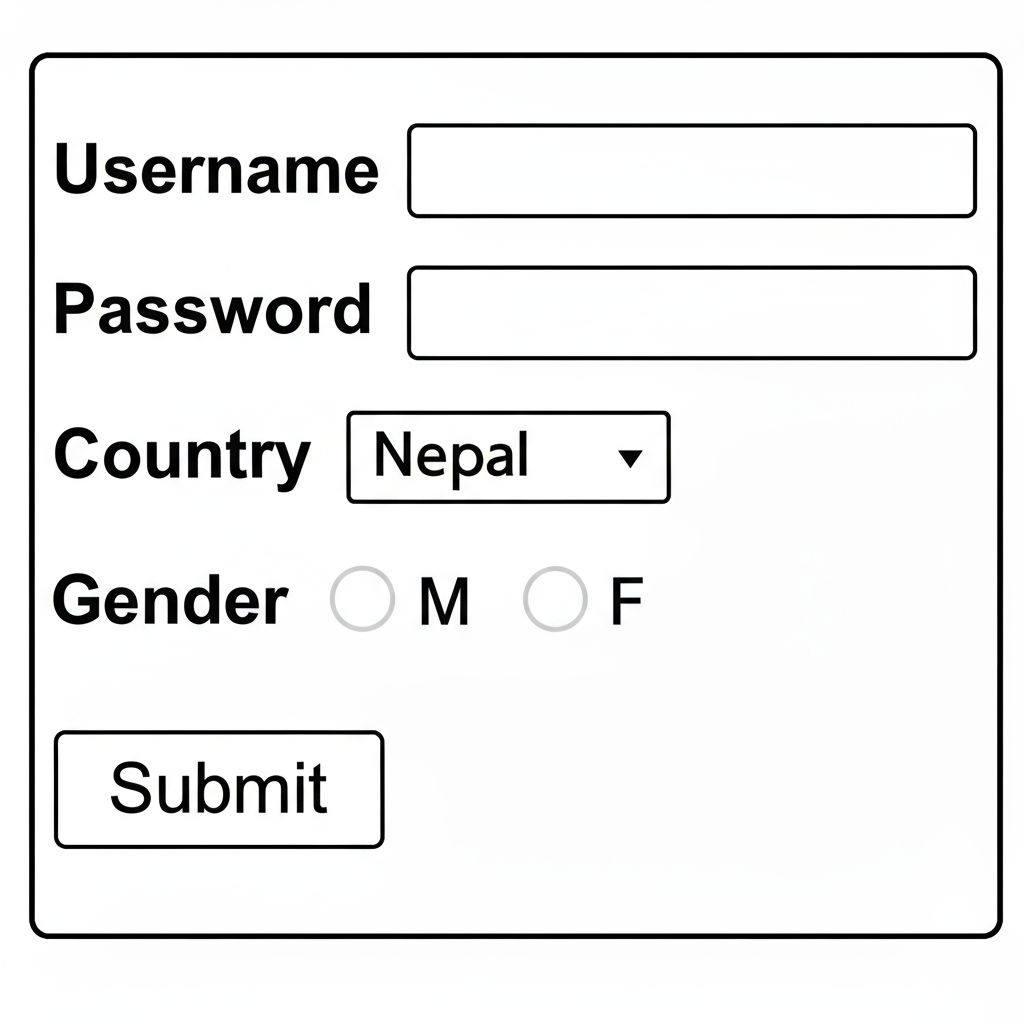 [10]
[10]
HTML Form with JavaScript Validation
An HTML form is used to collect user input, and JavaScript form validation ensures that the data entered by the user meets specific criteria before submission.
HTML Script with Form Validation
<html>
<head>
    <title>Registration Form</title>
    <script type="text/javascript">
        function validateForm() {
            var username = document.getElementById("username").value;
            var password = document.getElementById("password").value;
            var country = document.getElementById("country").value;
            var gender = document.getElementsByName("gender");

            // Username validation - at least 4 characters and required
            if (username == "" || username.length < 4) {
                alert("Username is required and must be at least 4 characters long.");
                return false;
            }

            // Password validation - starts with character, ends with #, required
            if (password == "") {
                alert("Password is required.");
                return false;
            }
            var firstChar = password.charAt(0);
            var lastChar = password.charAt(password.length - 1);
            if (!firstChar.match(/[a-zA-Z]/)) {
                alert("Password must start with a character.");
                return false;
            }
            if (lastChar != '#') {
                alert("Password must end with #.");
                return false;
            }

            // Country validation - must be selected
            if (country == "") {
                alert("Please select a country.");
                return false;
            }

            // Gender validation - must be selected
            var genderSelected = false;
            for (var i = 0; i < gender.length; i++) {
                if (gender[i].checked) {
                    genderSelected = true;
                    break;
                }
            }
            if (!genderSelected) {
                alert("Please select a gender.");
                return false;
            }

            alert("Form submitted successfully!");
            return true;
        }
    </script>
</head>
<body>
    <form onsubmit="return validateForm()">
        <b>Username</b>
        <input type="text" id="username"><br><br>

        <b>Password</b>
        <input type="password" id="password"><br><br>

        <b>Country</b>
        <select id="country">
            <option value="">Select</option>
            <option value="Nepal">Nepal</option>
            <option value="India">India</option>
            <option value="China">China</option>
        </select><br><br>

        <b>Gender</b>
        <input type="radio" name="gender" value="M"> M
        <input type="radio" name="gender" value="F"> F<br><br>

        <input type="submit" value="Submit">
    </form>
</body>
</html>
Explanation of Validation Rules
| Field | Validation Rule |
|---|---|
| Username | Required, minimum length of 4 characters |
| Password | Required, must start with an alphabet (a-z or A-Z) and end with # |
| Country | Must be selected from the dropdown (cannot be empty) |
| Gender | At least one radio button must be selected |
Key Concepts Used
document.getElementById()— to access form elements by their IDdocument.getElementsByName()— to access radio buttons by nameonsubmit="return validateForm()"— calls validation function before form submissionreturn false— prevents form submission when validation failscharAt()andmatch()— used for checking first and last characters of password- Regular expression
/[a-zA-Z]/— checks if a character is an alphabet
Conclusion
The form uses client-side JavaScript validation to ensure all fields are properly filled before submission. The onsubmit event triggers the validation function, and return false prevents submission if any rule is violated.
2.
How XML is different from HTML? Write XML script to create XML document containing element Person having sub elements Age, Name and Pincode. Write equivalent XSD for validating restrictions on the elements as the Age should be between 10 and 20, the Name should be only accepting either Ram or Shyam and the pincode should be 3 digit.[10]
3.
Write a server side script in PHP to illustrate inserting and selecting values to and from database table. Create required connection using your own assumptions.[10]
Section B
Short Answers Questions
Attempt any Eight questions.
[8*5=40]
4.
What are HTML keyboard events? Write a script to display a message 'Hello world' on keypress event. [5]
5.
How HTML elements are accessed using getElementById and getElementByTagName, illustrate using HTML script. [5]
6.
How can you define position property for specifying specific positioning of an HTML element? Write internal CSS to illustrate position of an HTML div. [5]
7.
What is chaining in jQuery? Write a script to illustrate concept of chaining using slideUp and slideDown method. [5]
8.
What is XML? Why is it called extensible? Mention the use of XML. [5]
9.
What is XMLHttpRequest object? Write HTML script with AJAX showing the use of XMLHttpRequest object. [5]
10.
Write a PHP program that includes a function that will take two strings as input argument and print concatenation of two strings. [5]
11.
How can you handle session in PHP? [5]
12.
Describe the WWW, web client and web server. [5]